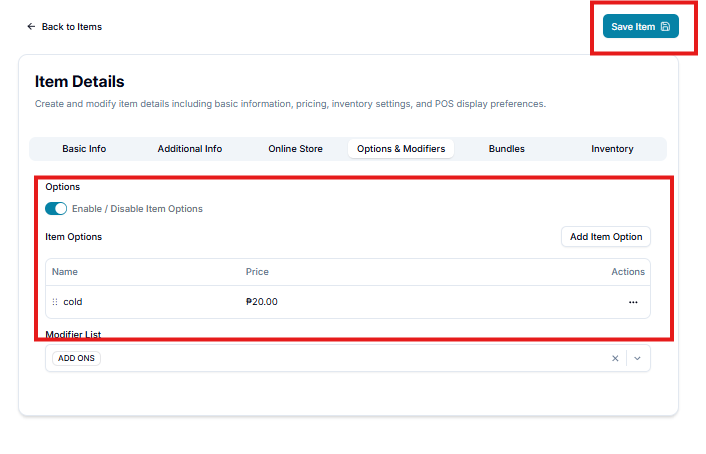
In this session, you can edit an item to include an item option and its details.
Let's get started:
- Hover/click the Tag icon/Listings > Items > Search Parent Item > Click 3 dots and click Option & Modifiers.
0:00
/0:10
Add Item Options
You can use Item Options to provide different choices or variations for an item, while Modifier Lists can be used for additional add-ons or customizations.
Step 1: Open the Item
- Go to Items.
- Select the item you want to edit.
- Open the Options & Modifiers tab.
- A. Item Option - Input your Item Option name.
B. Item Price - Input your items price.
C. Item Cost - Input your items cost .
D. Unit - Input your items unit. (ex. pc, scoop, ml, grams)
E. Copy Item Price - Enable if you want your items price on Register and Online Store be the same. **
H. Option Color - Assign a color of your Item Option.
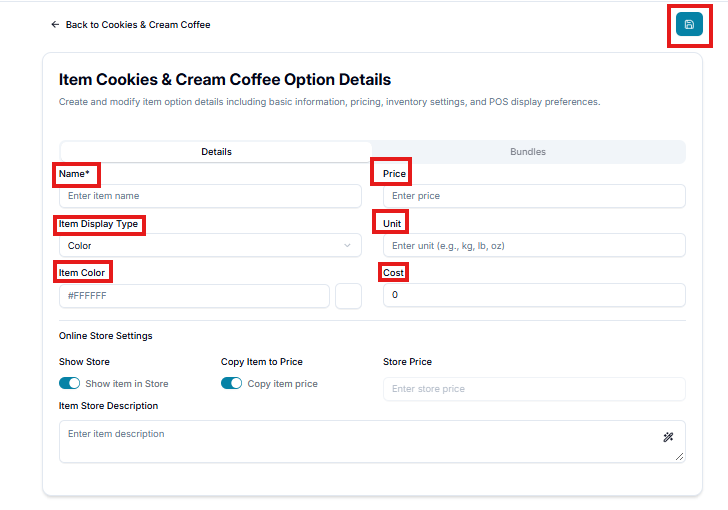
- If done, click Save.